|
Algebraic equation solver |
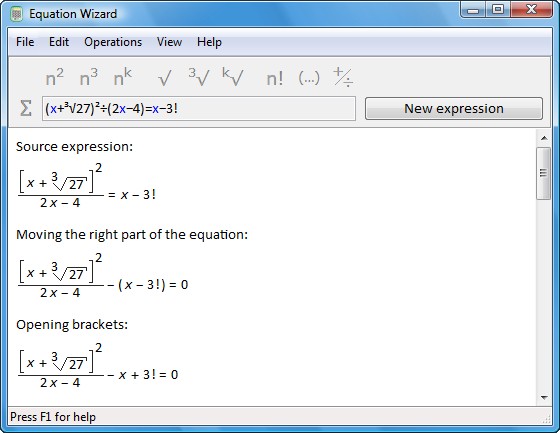
The program allows you to solve algebraic equations in the automatic mode. You just enter an equation in any form without any preparatory operations. Step by step Equation Wizard reduces it to a canonical form performing all necessary operations. After that it determines the order of the equation, which can be any - linear, square, cubic or, for instance, of the 7-th power. The program finds the roots of the equation - both real and imaginary. You just enter an equation you see in your textbook or notebook and click one button! In an instant, you get the step-by-step solution of the equation with the found roots and the description of each step. The solution is completely automatic and does not require any math knowledge from you. Then just print the result or save it to a file. |
|
Clipboard manager |
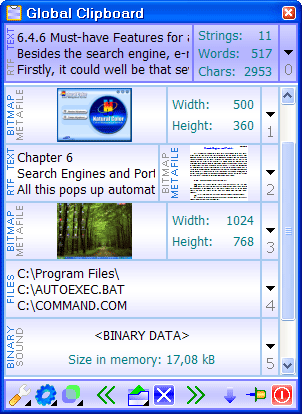
Global Clipboard is a multifunctional clipboard manager. The program saves all the information that is copied to the clipboard. Therefore, you can restore any data used during your work. A flexible interface and convenient viewing make it possible to receive all the information on each data fragment.
The Global Clipboard manager allows filling in forms easily, because it keeps a list of necessary information that is always visible. Now you can see the number of strings, words and symbols of the copied text, and also the sizes of images or screenshots. With this program, you can use the clipboard to merge texts copied from different applications. |
|
System performance monitor |
System Eye is a system monitor. The program shows usage of the main parameters of your computer - the processor, operative and virtual memory, and also a swap file. Therefore you can always watch its productivity, control too exacting applications, quickly find not responding programs and losses of memory. With System Eye you will be sure that your computer is adjusted optimally and the installed software works stably and economically. |
|
The program has the convenient and tuned interface, therefore does not occupy a lot of place on the screen. However, it is enough to lift eyes and you will see the graphic indicators displaying work of your PC. If the gauge of memory usage is full, it is necessary to close unused applications. If the system slowly reacts to your actions, look at the indicator of processor usage and close the died program. Starting the huge application, switch on a mode of the dynamic diagram, and you will see, how loading of your computer was changing during work time. |
|
|
|
|
The program supports flexible skins, that you could maximum conveniently place its window on a desktop: horizontally along the taskbar, vertically along programs windows, or even in the screen corners! Also, System Eye has the unique mechanism, which itself will keep up resources usage and in case of an overload will restore high performance. For example, if all operative memory is used, System Eye can automatically start the program for its clearing. |
|
|
| Contact us |
| © 2005-2007 ElasticLogic |